Best Free Local-First Todo Apps: 6 Picks That Keep Your Tasks Yours
Your todo list knows more about you than your diary does. It holds your deadlines, your obligations, and the call you keep avoiding. If you use a mainstream todo app, all of that sits on someone else's server, tied to an account the company can throttle behind a subscription. Local-first flips that: your tasks live on your device, the cloud becomes optional, and sync is something you choose. Here are six of the best free local-first todo apps, a sync guide that runs from free DIY tools to the apps' own paid plans, and one honorable mention that skips the text files entirely.
The Quick Answer
The best free local-first todo apps:
- Obsidian Tasks: best overall, with deadlines and queries inside your notes
- Logseq: best for outliner thinkers, with a built-in journal habit
- Anytype: best built-in sync, end-to-end encrypted and included
- Taskwarrior: best command-line tool, with dependencies and recurrence
- Todo.txt: the simplest format that can possibly work
- Lakun: best pick when you want local-first without text files
Pick one, move your tasks in this weekend, and set up sync before you need it.
What Does "Local-First" Actually Mean?
Local-first means the app treats your device as the source of truth. Your tasks live on your own disk, the app works with zero internet, and no account wall stands between you and your own data. Cloud-first apps do the opposite: the server holds the real copy, and your phone only borrows it.
Within local-first, you'll meet two flavors. Plain-text tools store tasks as markdown you can read without any app. Open the file in Notepad and there's your week. GUI apps store data on your device in their own format and give you polish instead of file access. Both keep the data on your disk; they differ in whether you or the app does the reading. Plain text holds one edge nothing else matches: it outlives apps. Companies pivot, apps get acquired and shut down, and export features die with them. Your .txt file does not care.
What Should You Look for in a Local-First Todo App?
Judge every candidate against these six checks:
- Your device is the source of truth: the app works fully offline; a dead router can't hide your tasks
- Free, not freemium-crippled: you shouldn't pay to see your own tasks
- Sync you choose: free DIY tools, or a paid add-on you can drop anytime, never a mandatory server
- No account required: if an app needs your email before showing your tasks, it's cloud software
- Export equals copy: leaving should be as simple as an export button or copying a folder
- Survives the app: data in an open format, plain text best, or at least freely exportable
Most mainstream apps fail the first check and call the result "offline mode." That's a different thing entirely.
How Do the Top Free Local-First Todo Apps Compare?
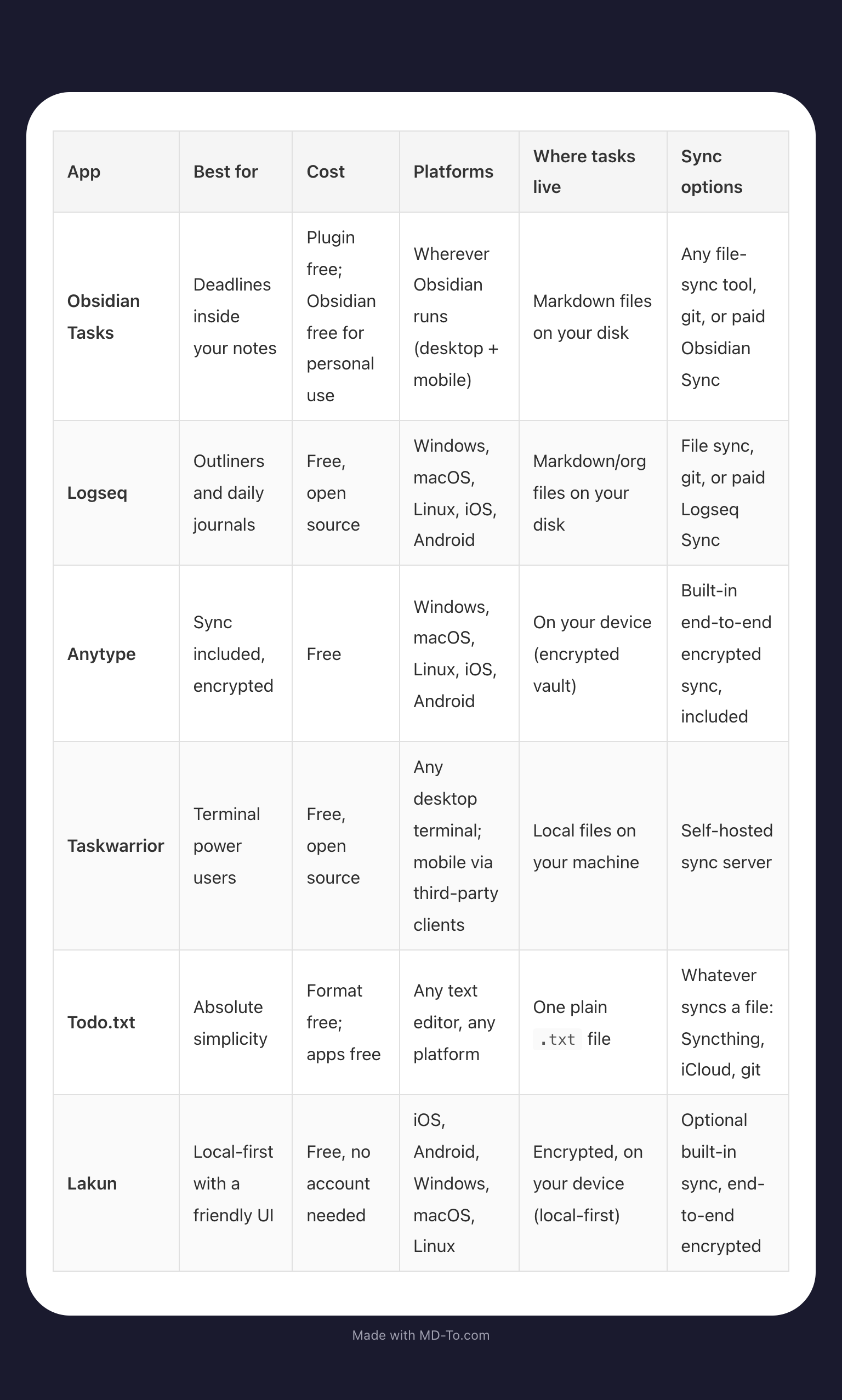
Every app in this table works fully offline; that was the entry fee. The difference is what happens when you want your tasks on a second device, which is exactly where the next sections come in.
Quick decision guide:
- Pick Obsidian Tasks if you already take notes and want tasks to live beside them
- Pick Logseq if you think in outlines and want today's tasks on today's page
- Pick Anytype if you want sync handled for you, end-to-end encrypted, out of the box
- Pick Taskwarrior if the terminal is your happy place and you need dependencies between tasks
- Pick Todo.txt if you want the simplest thing that cannot die
- Pick Lakun if "open a .txt file" sounds like homework to you
How Do You Sync Local-First Tasks Across Devices?
Here's the honest part: sync is the tax local-first charges you. You have four ways to pay it, from free to paid, and all of them keep you in charge.
- The app's own sync (the easy button). Obsidian offers Obsidian Sync, Logseq sells Logseq Sync as a paid add-on, and both exist so you never have to think about folders. Obsidian Sync is end-to-end encrypted, which means their server stores scrambled bytes it cannot read. Anytype and Lakun take the same idea further and build optional encrypted sync right into the app.
- Syncthing (the free standard). Open source and peer-to-peer: your devices mirror folders directly, with no server in the middle. iOS support needs a third-party client and is the fiddliest corner of the whole setup.
- A git repository (the power move). Push and pull your tasks folder like code. You get full version history of every checkbox you've ever ticked, which is more satisfying than it should be.
- A file-sync service you already use. iCloud or Dropbox work too. Least private of the four, since your files pass through a vendor, but the data stays yours and readable.
Paying the app's maker for sync can still be local-first. The test is simple: the data lives on your devices, sync is an optional add-on, and you could swap it for Syncthing next month without losing anything. A mandatory server with no exit is cloud software wearing a local costume.
Set up whichever route you pick on the day you install, because the day your laptop dies is a bad day to learn about sync. An unsynced local-first setup is a single point of failure with extra steps.
What Actually Works: Our Pick
For most people, Obsidian Tasks is the one to install tonight. The plugin is free and lives inside an app you may already use. It turns scattered checkboxes into a system: due dates, recurring tasks, priorities, and queries that surface everything due today across every note you own. The magic is that tasks live inside your actual notes, so the meeting note and its action items never separate.
Taskwarrior wins if you live in a terminal; nothing beats task add for speed, and its recurrence and dependency handling run deeper than any GUI. Anytype wins if you'd rather never think about sync at all, since it's the closest thing here to a cloud app's convenience with none of the cloud. And if you want zero dependencies forever, a todo.txt file from 2009 will still open in whatever text editor exists in 2049. That's the whole pitch.
Honorable Mention: Lakun
Full disclosure: Lakun is our app. That's exactly why it sits in the honorable mention slot instead of taking a ranking position from tools that earned theirs on merit alone. The bar for this list is genuinely high, and Lakun clears it: free with no account needed, fully offline by design, with your list stored encrypted on your device. It runs on iOS, Android, Windows, macOS, and Linux.
What you get:
- Due dates keep your week honest
- Categories split life into work, personal, and the rest
- Priorities survive the days everything is on fire
- Descriptions hold the details a task title can't
- Encrypted local storage keeps your tasks scrambled on your device, whether or not you ever turn on sync
- Optional encrypted sync keeps a second device in step, end-to-end encrypted, so the sync server never sees your list
Notice what's missing: no account wall before your first task, and the full local experience costs nothing. Did you read this list and think, "I want my tasks off the cloud, but I don't want to live in text files"? Lakun was built for exactly that. If plain text is the whole point for you, the five above will serve you better. Either way, your tasks stay yours.
FAQ
What Is the Best Free Local-First Todo App?
Obsidian Tasks, for most people. It's free, stores tasks in markdown files on your disk, and handles due dates, recurrence, and queries. Taskwarrior is the pick if you prefer a terminal, and todo.txt if you want the fewest moving parts.
Is Todoist Local-First?
No. Todoist requires an account and syncs through its own servers, so your tasks live in the cloud first. Great app, wrong category. If keeping tasks off servers is the goal, choose one of the tools above or Lakun.
How Do I Sync Local-First Tasks Across Devices?
Let the app handle it: Obsidian and Logseq sell their own sync, and Anytype and Lakun ship optional encrypted sync in the app itself. Or keep it DIY by mirroring your tasks folder with Syncthing for peer-to-peer sync, or by putting the folder in a git repository for version history. iCloud and Dropbox also work, with the tradeoff that files pass through a vendor's servers.
Is Paid Sync Still Local-First?
Yes, if the data lives on your devices and the sync is an optional add-on you can replace. Obsidian Sync passes that test and is end-to-end encrypted. If the server is mandatory and there's no clean export path, it's cloud software, whatever the marketing calls it.