Best Todo App for Students: 6 Picks That Actually Stick
You've downloaded three todo apps this semester. Your tasks still live in your head. The problem isn't your discipline. Most todo apps serve office workers with stable wifi and corporate budgets. Your semester runs on exam weeks, spotty campus wifi, and a student wallet. What you need is an app that matches how you actually study. Below are the six best todo apps for students. One is completely free and works without wifi. You'll also learn how to choose one that's still on your phone after midterms.
The Quick Answer
The best todo apps for students are Todoist (best overall), TickTick (reminders and focus timer), Notion (notes and tasks together), Google Tasks (simplest), Lakun (best free pick, fully offline, with deadlines, tags, and priorities), and My Study Life (timetables and exams). Pick one, load every syllabus deadline in week one, and check it every morning.
What Should Students Look for in a Todo App?
Most "best apps" lists ignore student reality: no budget, no time to learn complex tools, and deadlines that arrive in bursts. Judge every app against these six checks:
- Truly free: you shouldn't pay to see your own homework
- Due dates and recurring tasks: "every Tuesday" and "every other week" should both work
- Fast capture: adding a task should take under five seconds on your phone
- Works everywhere you study: phone, laptop, web browser
- Handles semester structure: classes, exams, and rotating schedules like labs
- Works offline: campus wifi will fail you during finals week; your app shouldn't need it
Most apps fail the offline test: they treat wifi like oxygen. If an app misses two of these checks, you'll abandon it by week three.
How Do the Top Six Todo Apps for Students Compare?
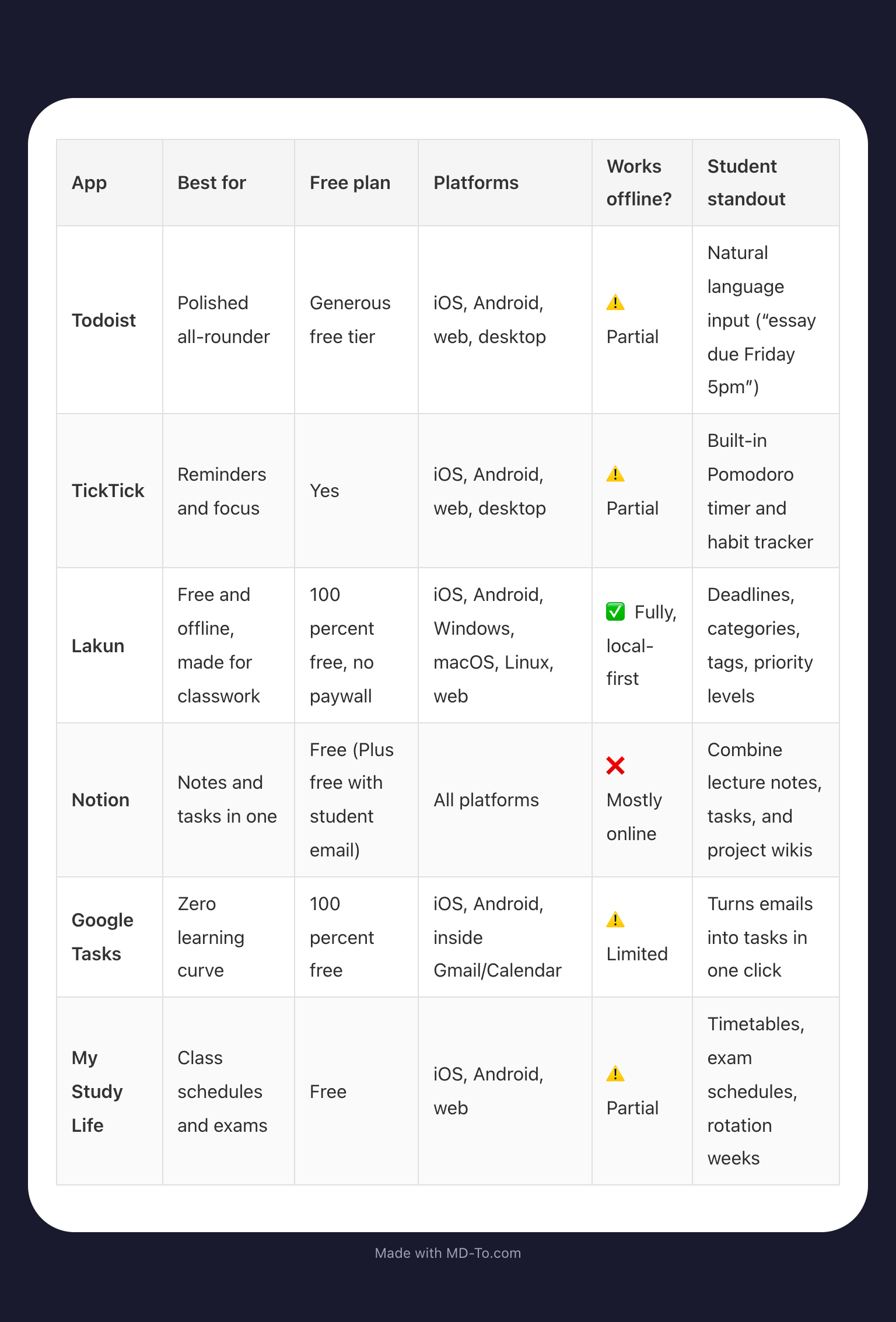
Quick decision guide:
- Pick Todoist if you want the most polished app with the biggest ecosystem
- Pick TickTick if you forget deadlines and need alarms plus a focus timer
- Pick Lakun if you want a genuinely free app that works with zero wifi and organizes everything by class, tag, and priority
- Pick Notion if your lecture notes and tasks should live in the same place
- Pick Google Tasks if you live in Gmail and want zero setup
- Pick My Study Life if your life runs on a timetable (labs, clinicals, rotations)
How Do You Stick to a Todo App for More Than a Week?
The app matters less than the habit. Students who actually keep using their app do these five things:
- Choose once, commit for thirty days. Switching apps resets your whole system every time.
- Load every syllabus deadline in week one. One brain dump, done forever.
- Do a two-minute check every morning. Attach it to something you already do, like checking messages.
- Capture fast, organize later. Dump tasks into an "inbox" during the day, then sort it on Sunday.
- Do a Sunday reset. Ten minutes: clear the inbox, plan the week, move what slipped.
What Actually Works: Our Pick
If we had to recommend one app for most students, it would be Todoist. The free plan covers everything a student needs: one project per class, due dates, and recurring tasks. Its killer feature is natural language quick-add. Typing "philosophy essay due Friday 5pm" creates the task instantly, which makes the app faster to use than to avoid. Notion wins if your lecture notes and tasks belong together; TickTick wins if reminders are your weak spot. But if you want one app to install tonight and still be using at finals, start with Todoist.
Honorable Mention: Lakun
Full transparency: Lakun is our app. That's exactly why it sits in the honorable mention slot instead of the main ranking. It earns its row in the table on its merits. The app is completely free with no paywalled features, works fully offline through a local-first design, and runs on every platform (iOS, Android, Windows, macOS, Linux, web). Its toolkit maps straight onto coursework: deadlines, one category per class, tags for task types like "essay" or "exam," and priority levels for finals week. If subscription fatigue or spotty campus wifi killed your last todo app, Lakun was built for exactly that. Any of the five apps above will serve you well otherwise.
FAQ
What Is the Best Free Todo App for Students?
Todoist's free plan is the best all-round free option: projects, due dates, and recurring tasks at no cost. If you want something even simpler, Google Tasks is completely free and ties into Gmail and Google Calendar.
Is Notion or Todoist Better for Students?
Todoist is better for pure task management: it's faster, simpler, and more reliable for deadlines. Notion is better if you want notes, tasks, and project planning in one workspace, and students get the Plus plan free with a school email. Many students use both: Notion for notes, Todoist for tasks.
Do Todo Apps Actually Help Students Study?
Yes, but indirectly. They reduce the mental load of remembering deadlines, which frees attention for actual studying. Seeing your whole workload also helps you plan realistically. The boost comes from the planning habit you build around the app.
Conclusion
The best todo app for students is the one you check every day. Todoist covers most people, TickTick handles reminders, and Notion bundles notes and tasks in one workspace. Lakun, free and fully offline, stands as the honorable mention. sPick one tonight, add your next three deadlines, and see how it feels by the weekend.